Authentication
Every call carries one access token, sent as an HTTP Bearer credential:
Authorization: Bearer aov_pat_2Fj9xK...The token authenticates the caller and selects the store. That is why no shop id appears on any path — the store comes from the token, never from the request.
Token format
aov_pat_<43 characters, base64url>The aov_pat_ prefix is there so a token is recognisable on sight — in a secret scanner, a code review, or a log line you were not expecting it in.
Managing the token
In the app: Settings → AOV MCP → Public API access.
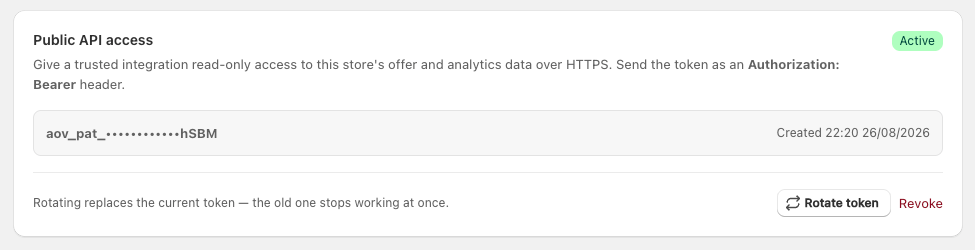
Once a token exists the card shows only its last four characters and the date it was created — the full token is never displayed again.
| Action | What it does |
|---|---|
| Generate token | Mints the store's first token and shows it once |
| Rotate token | Mints a fresh one and revokes the previous one immediately |
| Revoke | Stops the current token at once, with nothing issued in its place |
One live token per store. Generating always replaces.
Uninstalling the app revokes it too, along with any MCP connection — every credential the app issued for that store stops working, whether or not you revoked it first.
sha256 hash — so nobody, including us, can read your token back out of the database. Lost means rotate, not recover.Checking a token
Any endpoint works as a health check. The cheapest is the offer count:
curl -i -H "Authorization: Bearer $AOV_TOKEN" \
  https://aov-post-purchase.firebaseapp.com/public-api/v1/data/offers/count
A working token returns 200 and a payload whose shopDomain names your store — a useful sanity check when you hold tokens for several stores.
Rejections
| Body | Meaning |
|---|---|
{"success": false, "error": "Missing access token"} | No Authorization header, or not in Bearer <token> form |
{"success": false, "error": "Invalid access token"} | The token does not match a live token — wrong, rotated away, or revoked |
{"success": false, "error": "Service unavailable"} | The token could not be checked at all — a transient failure on our side, returned as 503 with Retry-After |
The first two return 401 and mean the credential is wrong; the third is not a 401, deliberately, so a client retries instead of rotating a token that was never the problem.
Handling the token in code
- Read it from an environment variable or a secret manager. Never commit it, and never ship it in a browser bundle — anything running in a page hands the token to whoever opens developer tools.
- Send it in the header only. Never in a URL or query string, where it lands in access logs, proxies and browser history.
- Keep it out of error reports. A logged request object usually carries its headers.
- One token per store. If your integration serves several merchants, store each token against its own shop and never fall back to another.
Scopes
There are none, deliberately. The token grants read access to one store's offer and analytics data — the whole surface, and nothing beyond it. There is no write endpoint for a scope to protect, and no way to widen what a token can reach.
Revoking is the control, and it takes effect on the next request.
Three ways a token stops working
| What happens | |
|---|---|
| Rotate token | The old token dies the moment the new one is minted |
| Revoke | The token dies, and none is issued in its place |
| Uninstalling the app | Every token the app issued for that store is revoked, the API token and the MCP connection alike |
How this differs from the MCP connection
| Store API | MCP | |
|---|---|---|
| Credential | Access token you copy | Connect code, exchanged for a token by the client |
| Who holds it | Your integration | The AI client |
| Issued by | Public API access card | Connect Claude to this store card |
| Revoked by | Rotate or Revoke | Disconnect or New code |
They are independent. Revoking one does not touch the other.