Return-Rate Guardrail
What Is It?
The Return-Rate Guardrail automatically pulls a product out of your Post-purchase upsell offers once it gets returned too often, so a product that boosts AOV on paper but keeps coming back doesn't quietly eat that gain in return shipping.
By default, offers pick products by gross revenue, without knowing how many of them end up returned. Filtering by hand isn't practical either: an offer can pull from a collection or a dynamic pick (AI smart pick, cart's most/least expensive item), and the actual product for those is only resolved at the moment the buyer views the page, not when you build the offer.
When to Use It
- You've noticed certain upsell products drive AOV but come back at a high rate, eating the margin in return shipping
- You want one shop-wide safety limit instead of manually re-checking every offer's product list
- You want visibility into which specific products an offer is currently losing to returns, without digging through return reports
How to Turn On the Return-Rate Guardrail
Step 1: Open the guardrail settings
Go to Settings in the app menu, open the General tab, and scroll to the Return-rate guardrail section.
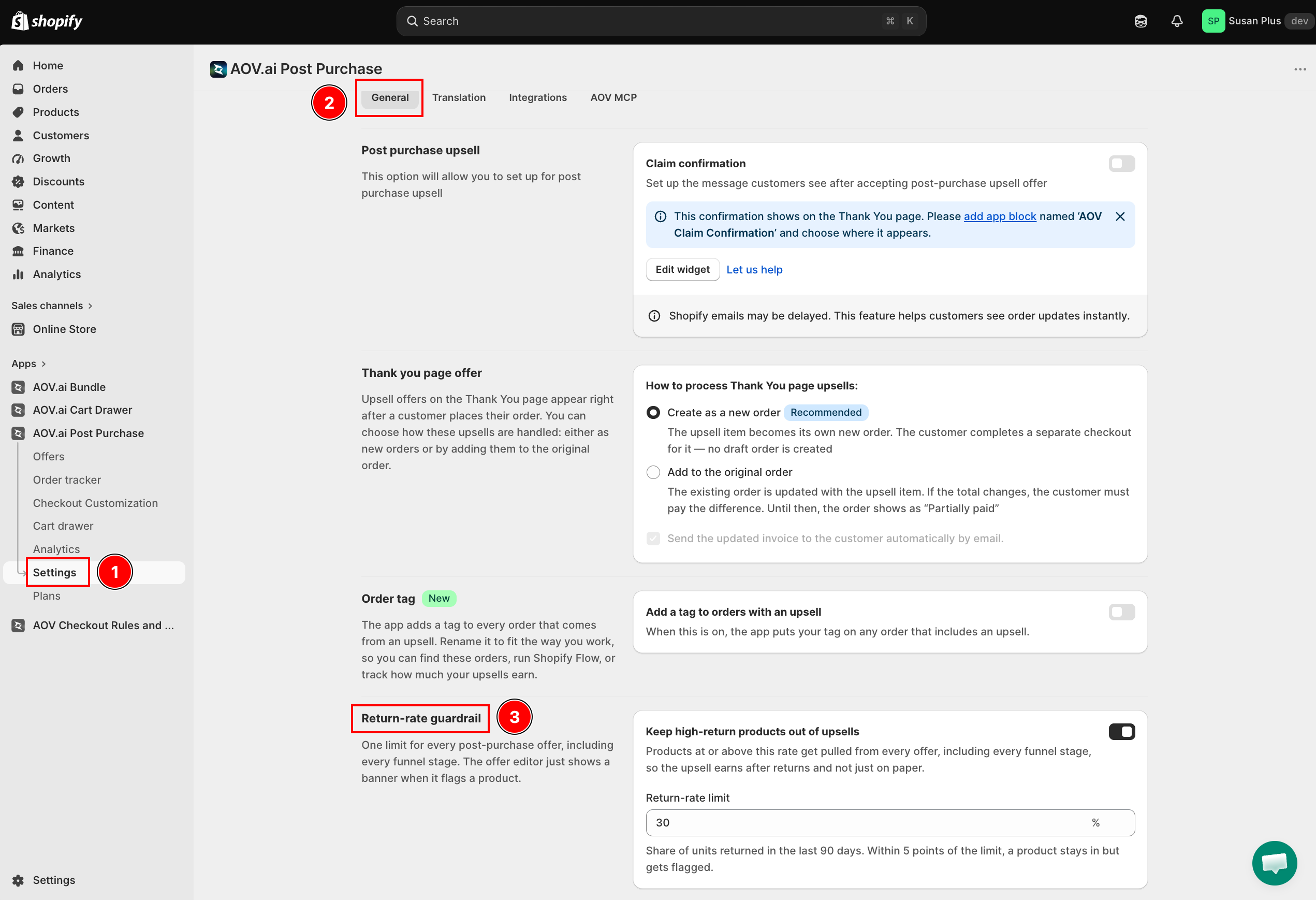
Turn on Keep high-return products out of upsells. Once enabled, the section explains: "Products at or above this rate get pulled from every offer, including every funnel stage, so the upsell earns after returns and not just on paper."
Step 2: Set the threshold
| Field | What it does |
|---|---|
| Return-rate limit | The share of units returned in the last 90 days that gets a product removed. Accepts a percentage with up to one decimal place (for example, 5.5%), between 5% and 100%. Defaults to 30%. |
The field description reads: "Share of units returned in the last 90 days. Within 5 points of the limit, a product stays in but gets flagged."
Setting an unusual value still saves, but shows a caution note:
- Below 10%: "A low threshold removes many products from your upsells."
- Above 70%: "A high threshold rarely removes any product."
Click Save.
Step 3: See which products are affected in the offer editor
Open any Post-purchase upsell offer and go to Step 2 of the editor. When the guardrail flags something in that offer, you'll see two kinds of read-only warning banners:
| Banner | Where | What it shows |
|---|---|---|
| Flagged by the return-rate guardrail | Top of the step, summarizing the whole offer | Total counts ("X removed, Y near the limit in this offer") plus a line per affected product across every funnel stage. |
| Per-stage banner (for example "2 products removed for a high return rate") | Inside each card (Upsell #1, Upsell #2, Downsell, etc.) | The rule restated with your live threshold, then the specific products that card loses or flags, with each product's actual return rate. |
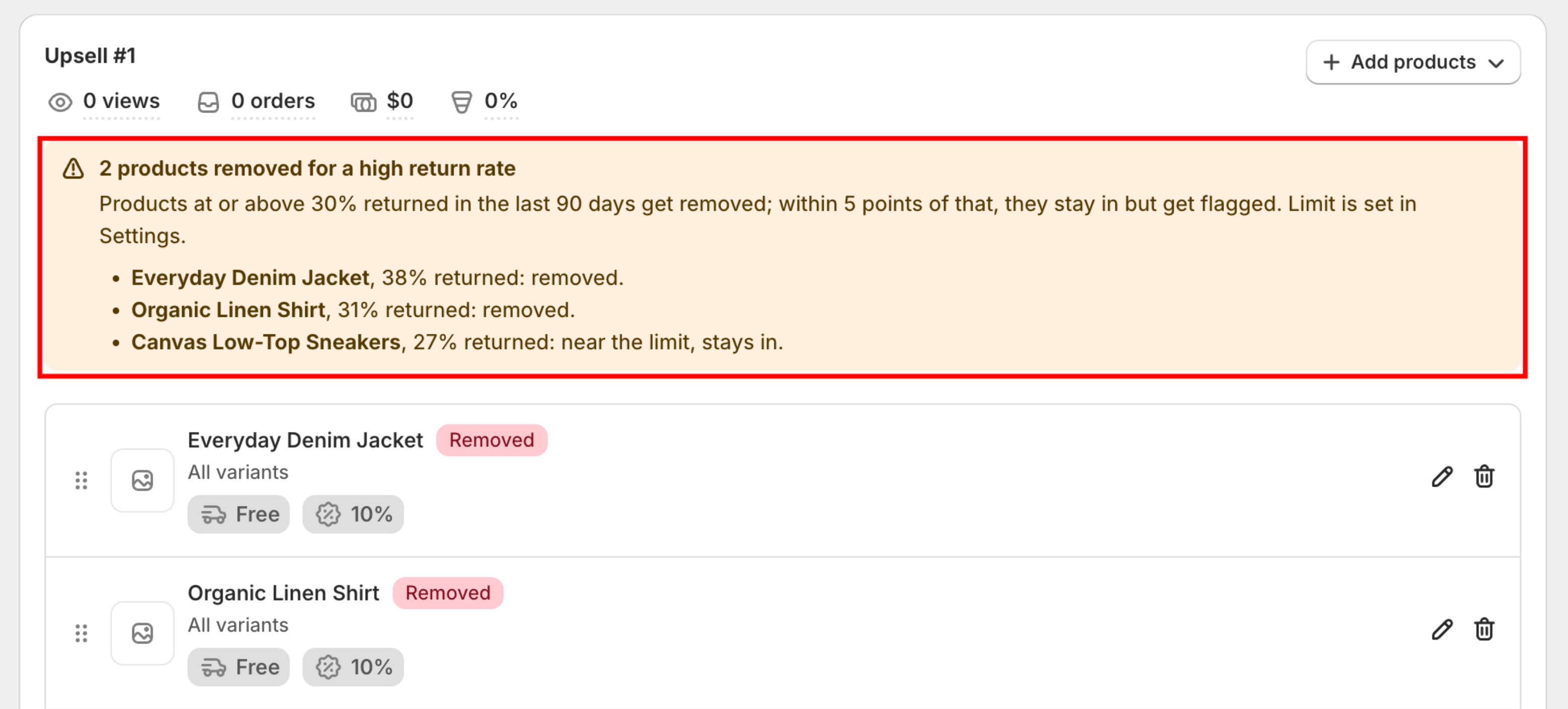
Both banners are informational only, the editor doesn't let you fix anything inline here. Click Manage in Settings on the summary banner to jump straight back to the threshold field.
Each affected product also carries a badge on its tile in the product list:
| Badge | Meaning |
|---|---|
| Removed | At or above the threshold. Excluded from the offer; buyers never see it. |
| Near the limit | Within 5 percentage points below the threshold. Still shown to buyers, just flagged so you're aware. |
| Checked per order | The product isn't known until a buyer views the offer, collections and dynamic picks (AI smart pick, most/least expensive in cart, Complementary product, etc.). There's no single rate to show upfront, so these are evaluated live for every order instead. |
Step 4: Check Order Tracker for blocked orders
If every product in a Post-purchase upsell offer is removed by the guardrail, the offer doesn't show at all for that order. Order Tracker records this with its own reason, Blocked by return-rate guardrail, so you can tell it apart from other "not shown" cases.
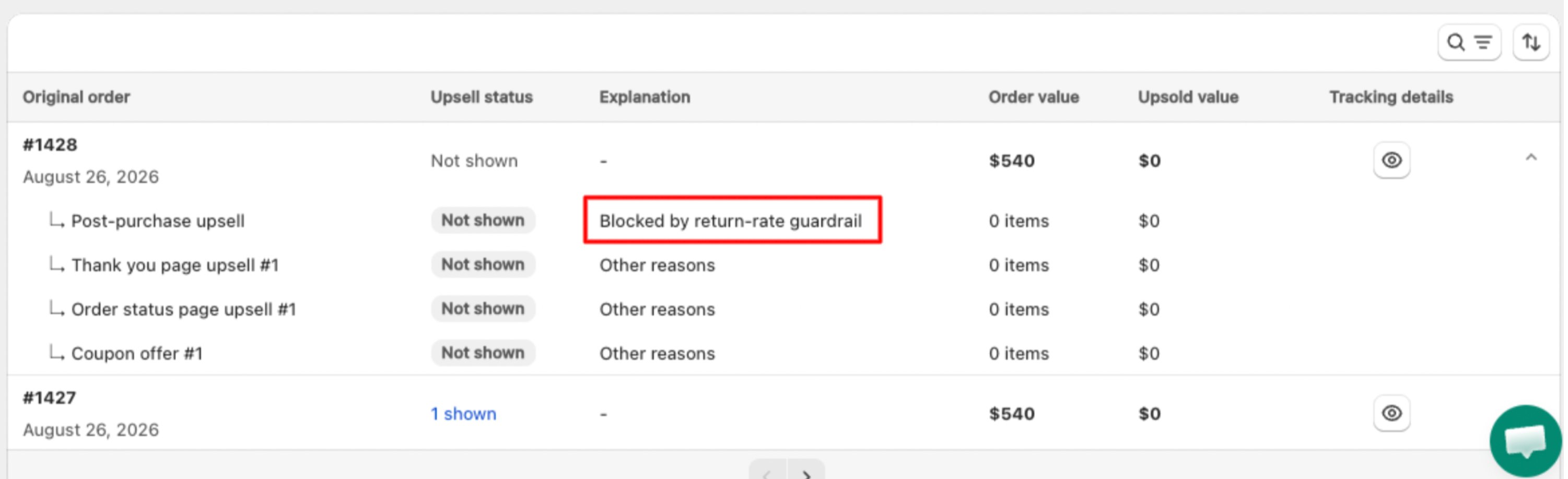
👉 See Order Tracker to filter orders by this reason.
Troubleshooting
Q1: I set the threshold, but nothing changed in my offer
The guardrail only removes products whose actual return rate is at or above your threshold. If none of your offer's products cross that line, no banner appears and nothing is removed. Also double check the offer is a Post-purchase upsell offer; other offer types aren't affected yet.
Q2: A product in my offer shows "Checked per order" instead of a rate
That's expected for anything not resolved to a specific product when you build the offer, collections, AI smart pick, Most/least expensive in cart, and Complementary product picks. The guardrail still applies to these, it just checks the concrete product at the moment a buyer views the offer instead of showing a rate upfront.
Q3: Can I override the guardrail for one specific product?
Not from the offer editor, it's read-only here. The threshold is one shop-wide limit set in Settings → General → Return-rate guardrail.
Q4: Why did an entire offer stop showing?
If every product in the offer's Upsell #1 (its root stage) gets removed by the guardrail, there's nothing left to show and the offer is skipped for that order. Check Order Tracker and filter by the Blocked by return-rate guardrail reason to confirm.