Specific Link
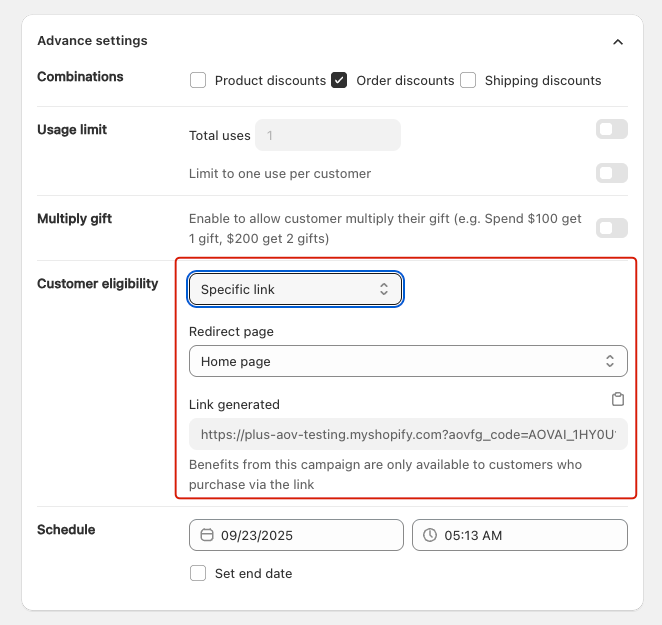
The Specific Link setting allows merchants to restrict a campaign so that only customers who access the store via a unique generated link can receive the campaign benefits
This feature is applied for all types of campaign.
Applicable Campaign Types
- Gift with cart value
- Gift with collection value
- Buy X Get Y
- Gift with quantity purchase
- Order goal
- Shipping goal
How it Works
- When enabled, the app generates a unique campaign link.
- Only customers who access the store through this link are eligible for the campaign benefits.
- Merchants can select a Redirect Page (e.g., Home page, Collection page, Product page) to control where the customer lands after clicking the link.
- If customers visit the store directly (not through the link), the campaign will not be applied.
Example
-
Merchant creates a “Spend $100 → Get a Free Gift” campaign.
-
Enables Specific Link and sets the redirect page to the Home page.
-
The system generates a unique link:
https://yourstore.myshopify.com?aovfg_code=AOVAI_XXXX -
Merchant shares this link with an influencer or via email campaign.
-
Only customers who enter through this link will be eligible to claim the free gift.
Setup Instructions
- Create or edit a campaign.
- Go to Advanced settings > Customer eligibility.
- Select Specific link.
- Choose a Redirect page (Home page, Collection page, Product page, etc.).
- Copy the generated link and share it with your customers.
- Save and activate the campaign.
Best Use Cases
- Influencer campaigns: Share a private link that applies exclusive rewards.
- Email marketing: Send subscribers a special campaign link.
- VIP promotions: Provide loyal customers with hidden offers via a direct link.