Subscription integration
This feature is available for Buy X Get Y campaigns only.
Overview
The Purchase Type setting lets you control whether a Buy X Get Y (BXGY) campaign applies to one-time purchases, subscription purchases, or both. This gives you precise control over how gifts are rewarded based on how customers buy your products.
Where to Find It
Go to Gift Campaigns in the app
Open an existing Buy X Get Y campaign or create a new one
In the Customer Buys section, find the Purchase Type dropdown
Purchase Type Options
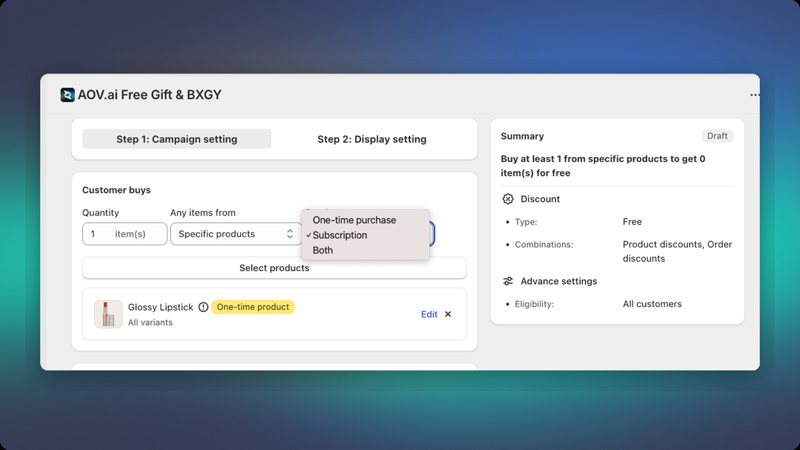
| Option | Description |
|---|---|
| Both (default, includes one-time + subscription) | Campaign applies regardless of purchase type. Gift is added for one-time purchases and on the first order of a subscription. |
| One-time purchase | Campaign applies only when the trigger product is purchased as a regular, one-time order |
| Subscription | Campaign applies only when the trigger product is purchased via a subscription plan |
How Each Option Works
Both (Default)
The default option. The gift is added for all customers, whether they buy the trigger product as a one-time order or via a subscription.
Behavior:
- Gift is added for regular one-time purchases
- Gift is added on the first subscription order only
- Recurring subscription orders do not receive the gift again
New campaigns default to Both so the offer reaches both one-time and subscription buyers. Switch to One-time purchase or Subscription if you want to restrict eligibility.
One-time Purchase
The gift is added when the customer adds the trigger product to cart without a subscription plan attached.
Behavior:
- Gift is added for regular one-time purchases
- Gift is not added if the trigger product is purchased as a subscription
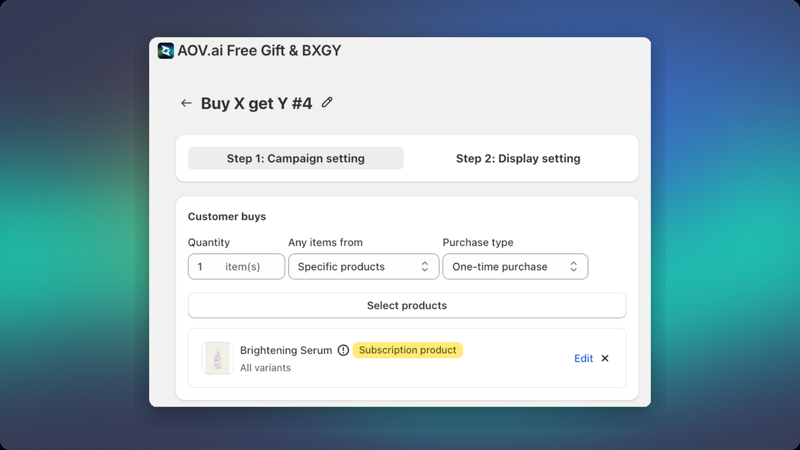
If your trigger product is sold as a subscription only (not available as a one-time purchase), a yellow warning badge will appear in the campaign editor to alert you of the mismatch.
Subscription
The gift is added when the customer purchases the trigger product with a subscription plan.
Behavior:
- Gift is added on the first order of the subscription only
- Recurring subscription orders do not receive the gift again
- Gift is not added for regular one-time purchases
Compatible subscription apps:
- Shopify native subscriptions
- Recharge
- Appstle
- Seal Subscriptions
- Joy Subscription
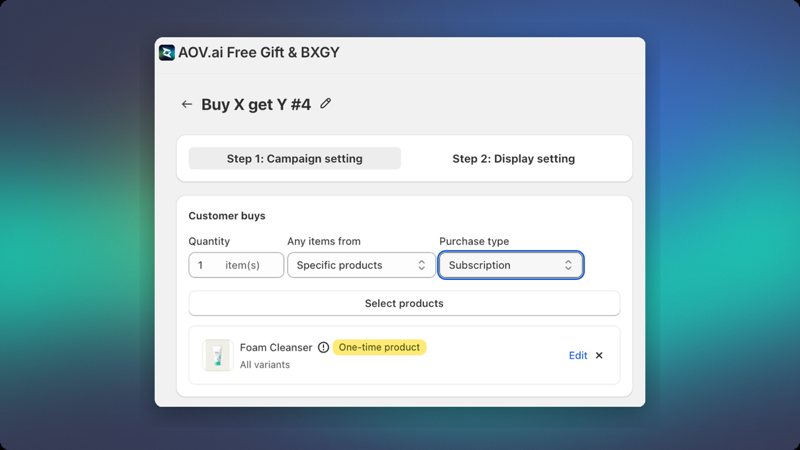
If your trigger product is a regular (non-subscription) product, a yellow warning badge will appear in the campaign editor to alert you of the mismatch.
Warning Badges
The system displays warning badges in the campaign editor to help you catch configuration mismatches before publishing.
| Situation | Badge |
|---|---|
| Trigger product is subscription-only, but Purchase Type = One-time purchase | ⚠️ "Subscription product" |
| Trigger product is a regular product (not subscription), but Purchase Type = Subscription | ⚠️ "One-time product" |
Stores Without Subscription Products
If your store has no subscription products, the Subscription and Both options will be disabled in the Purchase Type dropdown.
Hovering over the disabled options will show a tooltip:
"No subscription products found in your store"
To enable these options, set up subscription products using a compatible subscription app.