How to Calculate Options and Variants of the Bundle
Why This Matters
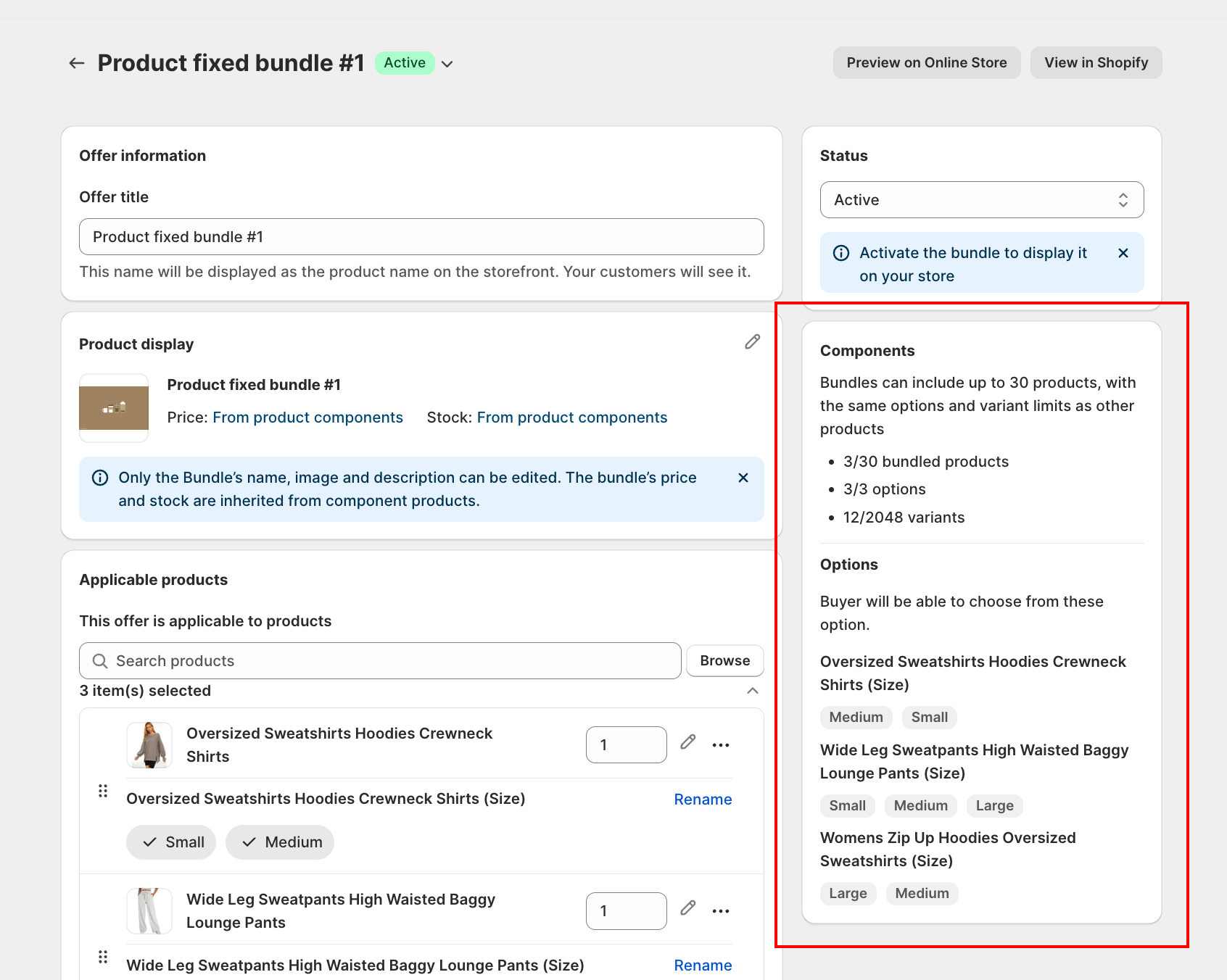
Product Fixed Bundle has a hard ceiling: 2,048 variants per bundle. That number comes from Shopify's product variant limit, not the app. If your bundle's components have a lot of size / color / flavor combinations, the math can hit that ceiling fast.
This page walks you through how the app calculates options and variants from your component products, with a worked example so you can predict whether a bundle will fit before you try to save it.
The Vocabulary
| Term | What it means |
|---|---|
| Option | A choice category within a list of products included in the bundle (for example Color, Size, Paper type) |
| Value | A specific choice within an option (for example Red, Medium, Dot) |
| Variant | A unique combination of selected option values (for example Red / Medium / Dot is one variant) |
| Bundled product | A component product you added to the bundle |
A T-shirt with options Size (S, M, L) and Color (Red, Blue, Green) has 3 × 3 = 9 variants. The options are Size and Color. The values for Size are S, M, L. Each unique combo is one variant.
How the Bundle Counts Each Thing
1. Bundled Products
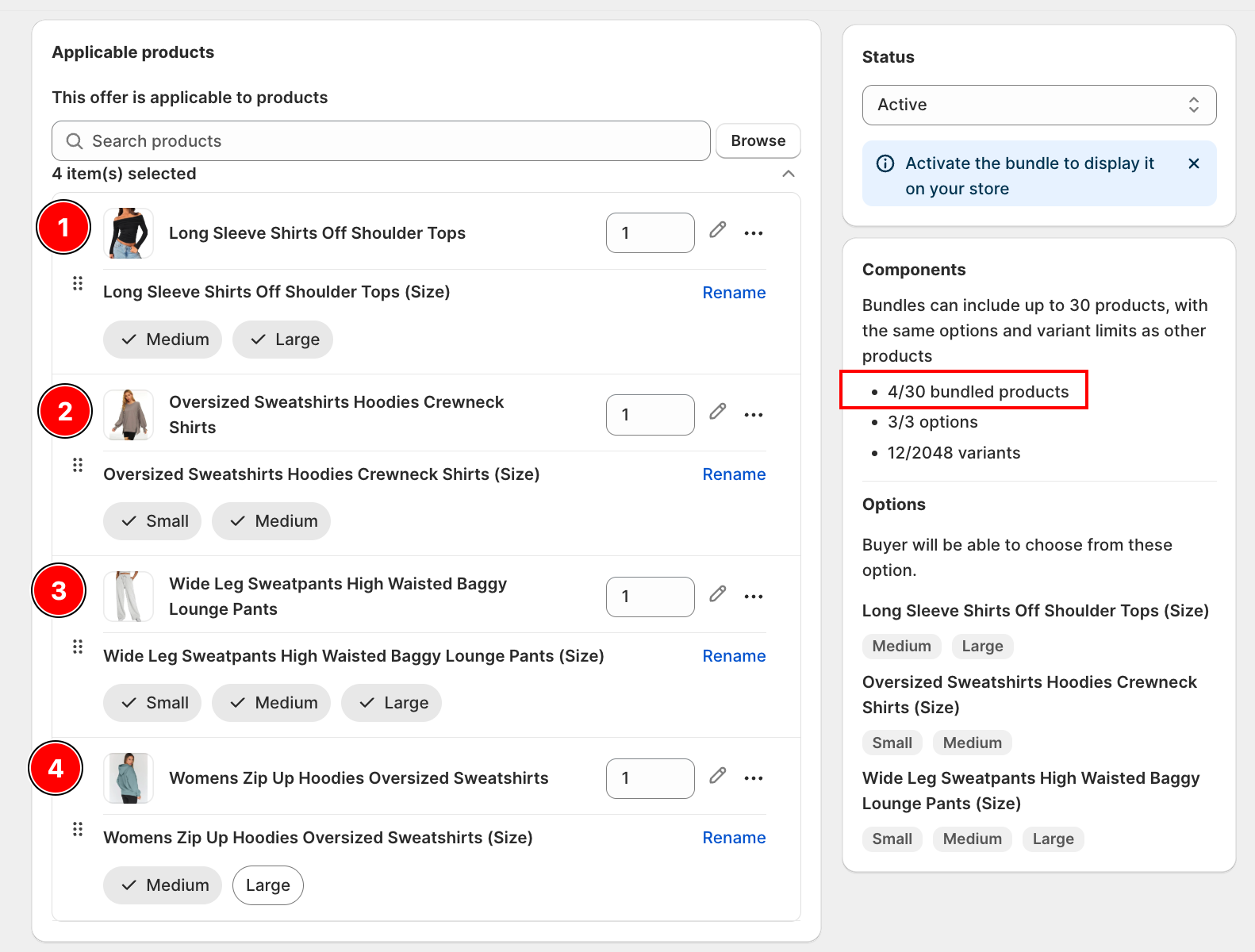
Every product you add to the bundle counts as one bundled product. The cap is 30 bundled products per bundle.
2. Options
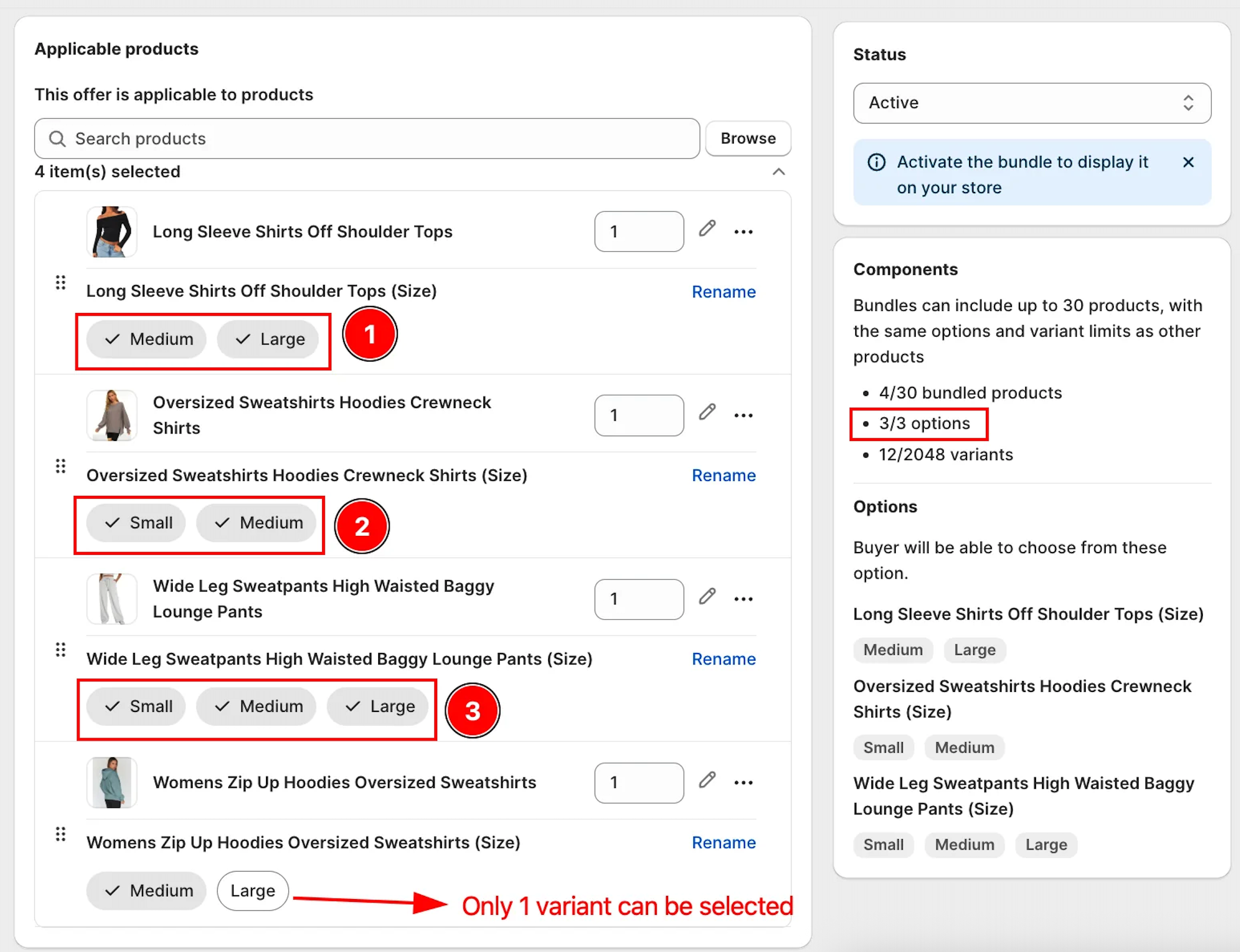
Each Shopify product option on a bundled product (Color, Size, Paper type, etc.) counts as one option for the bundle. The cap is 3 options per bundle total.
How options are counted across products in the bundle:
- Product A has Size and Color selected: that's 2 options
- Product B has Material selected: that's 1 option
- Total: 3 options — the bundle is now at the cap
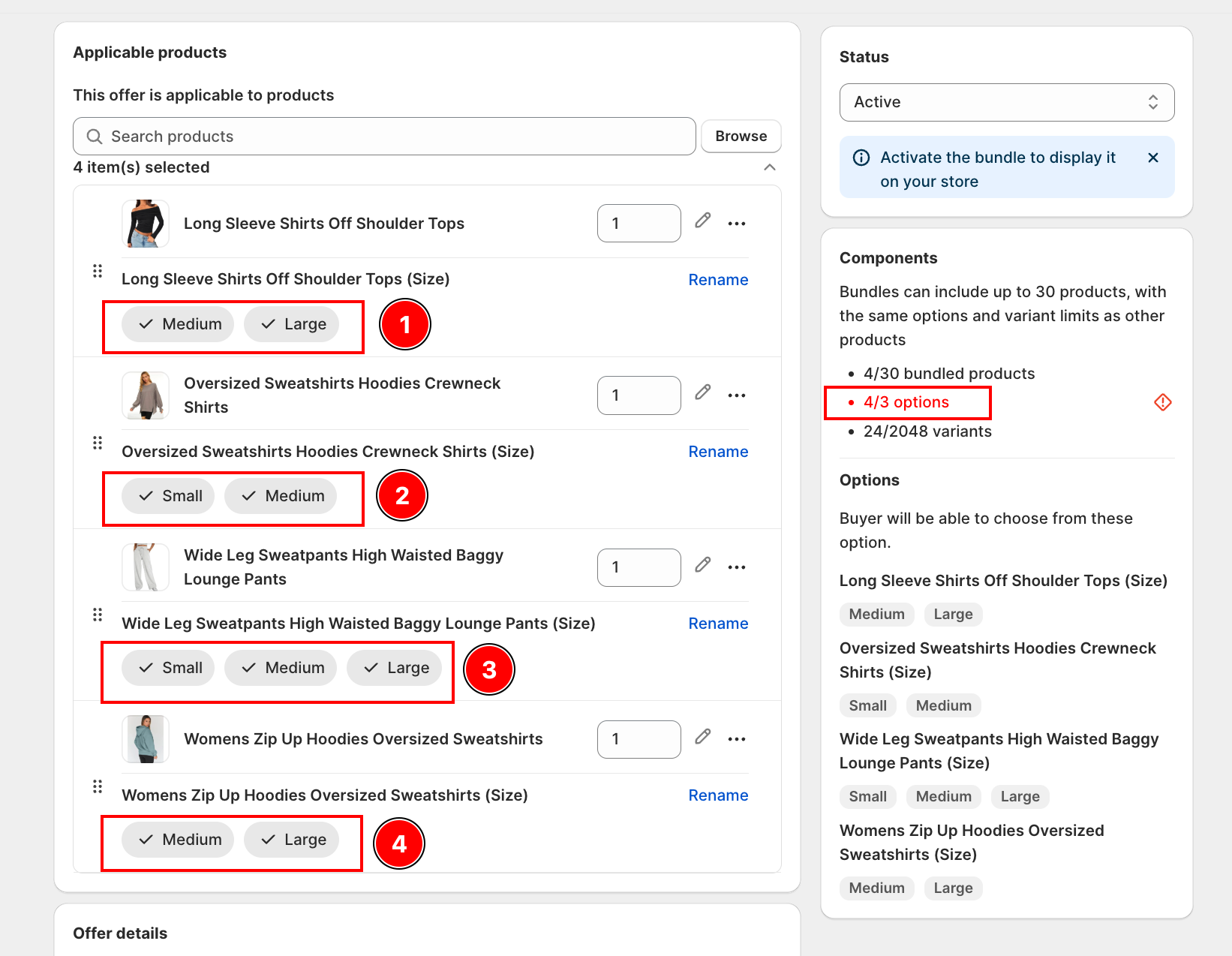
Any additional product (C, D, E...) added to the bundle must have no options (a single-variant product). If they have even one option, the bundle will exceed the 3-option limit and cannot be saved.
3. Variants
For one bundled product, variants = the product of how many values you selected for each of its options.
For the bundle as a whole, multiply each bundled product's variants together.
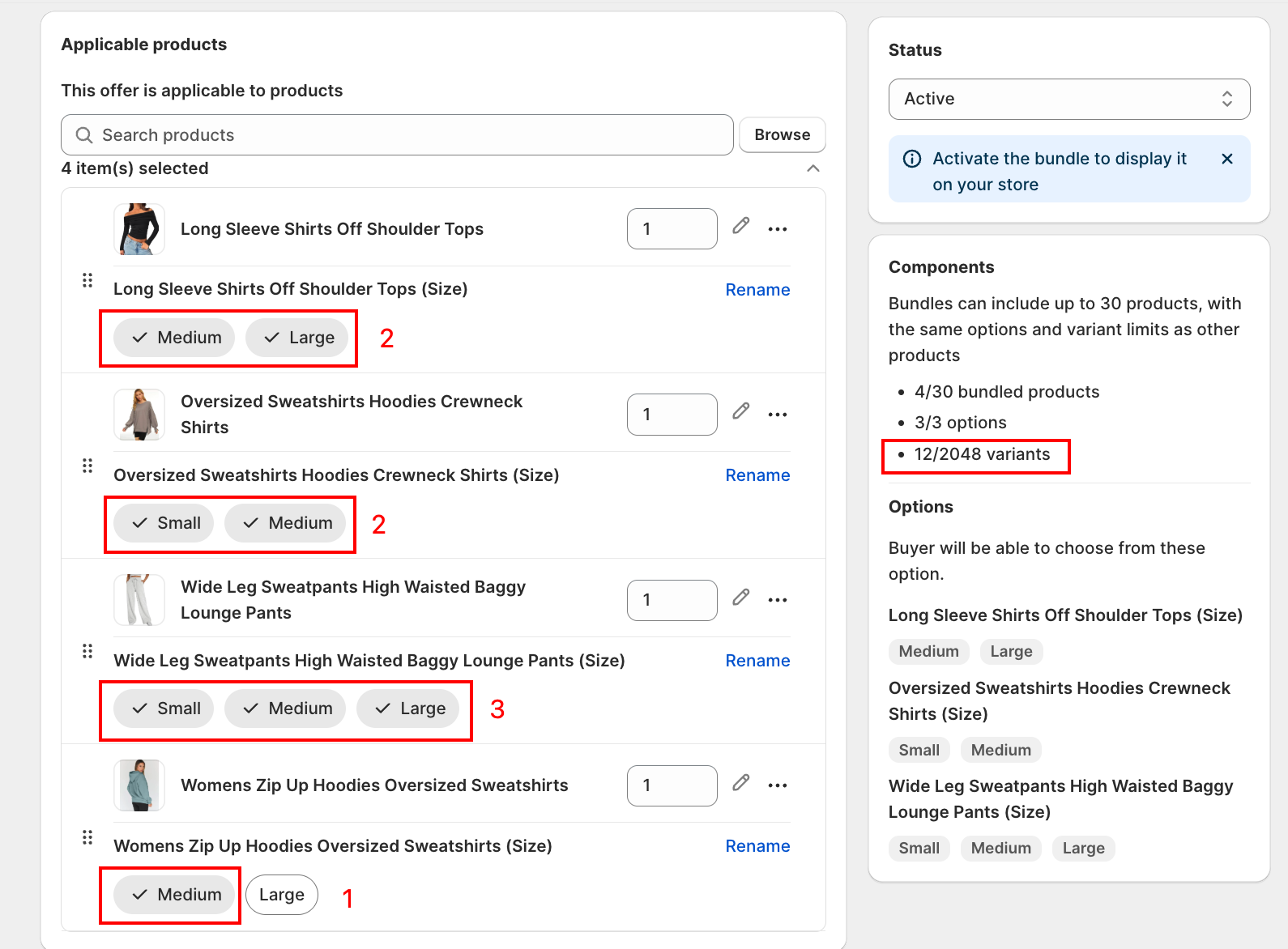
The cap is 2,048 variants per bundle.
Worked Example
Take two notebook products with their options and values:
| Product | Color | Size |
|---|---|---|
| Honey Bee Travel Notebook (P1) | Brown, Beige | A4, A5, B5 |
| Soft Feather Travel Notebook (P2) | Purple, Black | A4, A5 |
Bundle 1: P1 + P2
Bundled products: 2
Options for P1: Color (2 values), Size (3 values) → 2 options
P1 variants = 2 (Color) × 3 (Size) = 6
Options for P2: Color (2 values), Size (2 values) → 2 options
P2 variants = 2 (Color) × 2 (Size) = 4
Bundle 1 totals:
- Bundled products = 2
- Options = 2 (P1) + 2 (P2) = 4 options
- Variants = P1 variants × P2 variants = 6 × 4 = 24 variants
Already past the 3-option cap. To save Bundle 1, you'd need to drop one option from one of the components.
Bundle 2: P1 + P2 + P3
Add a third product P3 (a single-color, single-size journal with one Color option, 3 values: Black, Beige, Pink).
Options for P3: Color (3 values) → 1 option
P3 variants = 3 (Color) = 3
Bundle 2 totals:
- Bundled products = 3
- Options = 2 (P1) + 2 (P2) + 1 (P3) = 5 options
- Variants = 6 × 4 × 3 = 72 variants
Bundled products (3) is well under the 30 cap, and variants (72) is well under the 2,048 cap. But the option count (5) is past the 3-option cap. The Components panel will block the save until you reduce options to 3 or fewer.
Quick Formula Reference
Bundled products  = count of products you added
Options per BP    = number of Shopify product options on that bundled product
Bundle options    = sum of options across all bundled products
Variants per BP   = product of (values selected per option) on that bundled product
Bundle variants   = product of (variants per BP) across all bundled products
Caps to Watch in the Components Panel
| Limit | Cap |
|---|---|
| Bundled products per bundle | 30 |
| Product options per bundle | 3 |
| Variants per bundle | 2,048 |
The Components panel on the right side of the Product Fixed Bundle form shows the live counts as you add products. Watch the X/3 options counter especially closely. That's the one that trips first on bundles with many components.
How to Stay Under the Caps
- Reduce values per option: on each component, only select the values you actually want in the bundle (for example, only Brown and Black for Color, not all 6 colors)
- Drop a component: remove a product from the bundle if it pushes options over 3
- Split into smaller bundles: create two separate Product Fixed Bundles instead of one giant one
- Use Mix & Match instead: if your customers want to "pick one of each", Mix & Match Bundle handles arbitrary combinations without hitting the variant cap (each pick stays a separate Shopify product)
Next Steps
- How to set up Product Fixed Bundle: walk through the full setup flow
- How to sell multipack: selling tiered packs (3-pack, 5-pack) of the same fixed bundle