AOV.ai Bundle Upsell MCP
Point the AI tool you already use, Claude, ChatGPT, Gemini, Grok, Claude Code, Cursor, Codex, at this store's bundle data. Once connected, it answers questions about your offers, your bundle revenue, your plan and whether the widget is live, on its own, without you opening the app or sharing your Shopify login. With write access, it can also create and edit offers and widget design for you.
The assistant reads live data, so an answer is never stale.
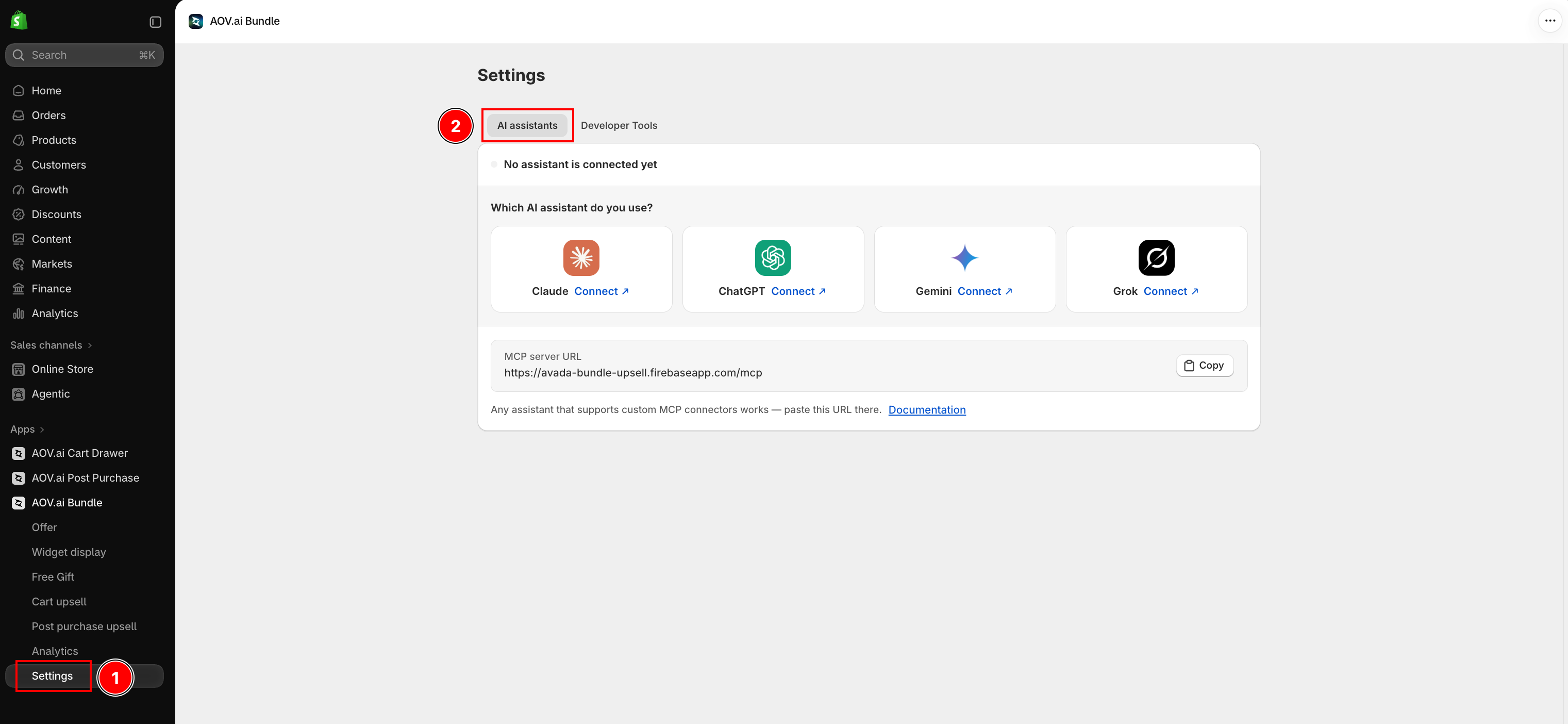
Two tabs, two permission levels
Two independent choices decide what a connection can do:
- Which tab you connect from. AI assistants (Settings → AI assistants) signs in with Shopify, no token to copy, for Claude, ChatGPT, Gemini and Grok. Developer Tools (Settings → Developer Tools) issues a token you paste into your own config, for Claude Code, Cursor, Codex, or any other MCP client, and also exposes a read-only Public API for scripts
- Which access level you grant. Every connection, on either tab, is Read-only or Read and write, chosen when you connect and fixed after that
| Read-only | Read and write | |
|---|---|---|
| Can approve | Any staff member who can view products | Only the store owner |
| Tools | 15 read tools | The 15 read tools, plus 12 write tools |
| Can change an offer or the widget | No | Yes, with your confirmation first |
See Authentication for how to connect on either tab, and Tool guide for what each tool does.
Read-write is server-enforced, and still asks first
A read-only connection has no write tools registered at all, the server has nothing a client could call to change an offer. A read-and-write connection does have them, guarded by three things:
- New offers start switched off. Turning one on is a separate step, after you have seen it
- A write limit of 60 per hour, per connection, counted across every write tool
- Every write is logged, and deleting an offer is permanent, there is no undo from inside the app
The assistant itself is instructed to summarize what it is about to do (an offer's type, products, discount, or a setting's old and new value) and wait for your yes before calling a tool that creates, changes or deletes anything. That instruction lives in the assistant's own system prompt, not in anything your store enforces, so read what it proposes before approving it.
One token, one store
A token (or a signed-in connection) is issued to one store and carries that binding itself. The store is never taken from the request, so a connection cannot be pointed at a different shop.
If you run more than one store, give each connection a distinct name. On the Developer Tools
tab, every generated snippet names the MCP server aov-bundle; AI clients that let you set a
server name key their list by it, so a second store's config can silently replace the first. On
the AI assistants tab, Claude and Gemini allow only one connector per URL, so a second store needs
?store=<domain>.myshopify.com appended to the server URL to tell the two apart.
What it can read
15 tools, grouped by what they answer:
| Area | What the assistant can answer |
|---|---|
| Setup | Whether the bundle widget is live on the storefront, and what is blocking it |
| Offers | Your offers by name, type or status, the full setup of any one, its change timeline (Fixed bundles only), and the fields a given offer type allows |
| Catalogue lookups | Products and collections by name, a product's variants, active Shopify discounts, customer segment names, and your store's markets |
| Suggestions | Products often bought together with one trigger product, ranked from your own order history, for a Frequently Bought Together offer |
| Performance | Additional revenue, bundle orders, attach rate, and the offers that earned most |
| Plan | Your plan, the revenue used this cycle, and your cap if your plan has one |
| Widget | The storefront widget settings for one offer type, colors, fonts, texts and layout |
What it can change, with write access
12 more tools, only on a Read and write connection:
- Create any of the six offer types: Frequently Bought Together, Volume Discount, Mix & Match Bundle, Bundle Builder, Product Fixed Bundle, Product Recommendation
- Edit any existing offer's fields, whatever its type
- Add Complementary products: mark suggested products in a Frequently Bought Together offer, or add Complementary slots to a Product Recommendation offer
- Turn offers on or off, duplicate one, or delete up to 10 at once
- Change widget settings: colors, fonts, texts and layout for one offer type
- Import an image from a public URL into the store's Shopify Files, for use in a Volume tier, a Bundle Builder banner, or similar
See the tool guide for every tool, its parameters and what it returns.
What it never returns
- No customer data. No names, emails, addresses, or individual orders. Performance figures are aggregates over a date range, and the customer segment tool returns only names
- No theme or storefront source.
get_setup_statusreads your theme server-side and returns conclusions; the files themselves never leave, and nothing here can change your theme - No orders or billing. Nothing here can read an individual order or change your subscription
- No credentials. Not your Shopify access token, not the connection token, not any internal record id
- No pricing or upgrade pitch. The plan tool reports what your store is doing. It does not list plans or quote prices
Available on every plan
Connecting to AI is not gated behind a subscription, a store on the free plan can connect, on
either tab, at either access level. The free plan's own revenue cap still applies to the app, and
get_plan_status is the tool that tells you where you stand against it.
Connected before September 2026?
Those connections only have the original 5 read tools (get_setup_status, get_offers,
get_offer_details, get_analytics, get_plan_status). The 10 additional read tools, write
access, and the Developer Tools tab all need a new connection, reconnect to pick them up.
Where next
- Authentication: sign in on AI assistants, or create a token on Developer Tools
- Install a client: Claude, Claude Code, Cursor, Codex and more
- Tool guide: all 27 tools
- Recipes: common questions, start to finish
- Troubleshooting: every refusal, and what it means
- Store API: the same read-only data as plain REST, for scripts