Claude web & desktop
The shortest path, and the only one with no secret to look after. Claude fetches its own token by sending you through Shopify, so there is nothing to copy, store, or leak. This is the AI assistants tab's flow; ChatGPT, Gemini and Grok follow the same shape, each with its own first step shown in the app, see Authentication.
Add the connector
- Copy the Server URL from Settings → AI assistants in the app.
- In Claude, open Settings → Connectors → Add custom connector.
- Paste the URL and click Add, then Connect.
https://avada-bundle-upsell.firebaseapp.com/mcp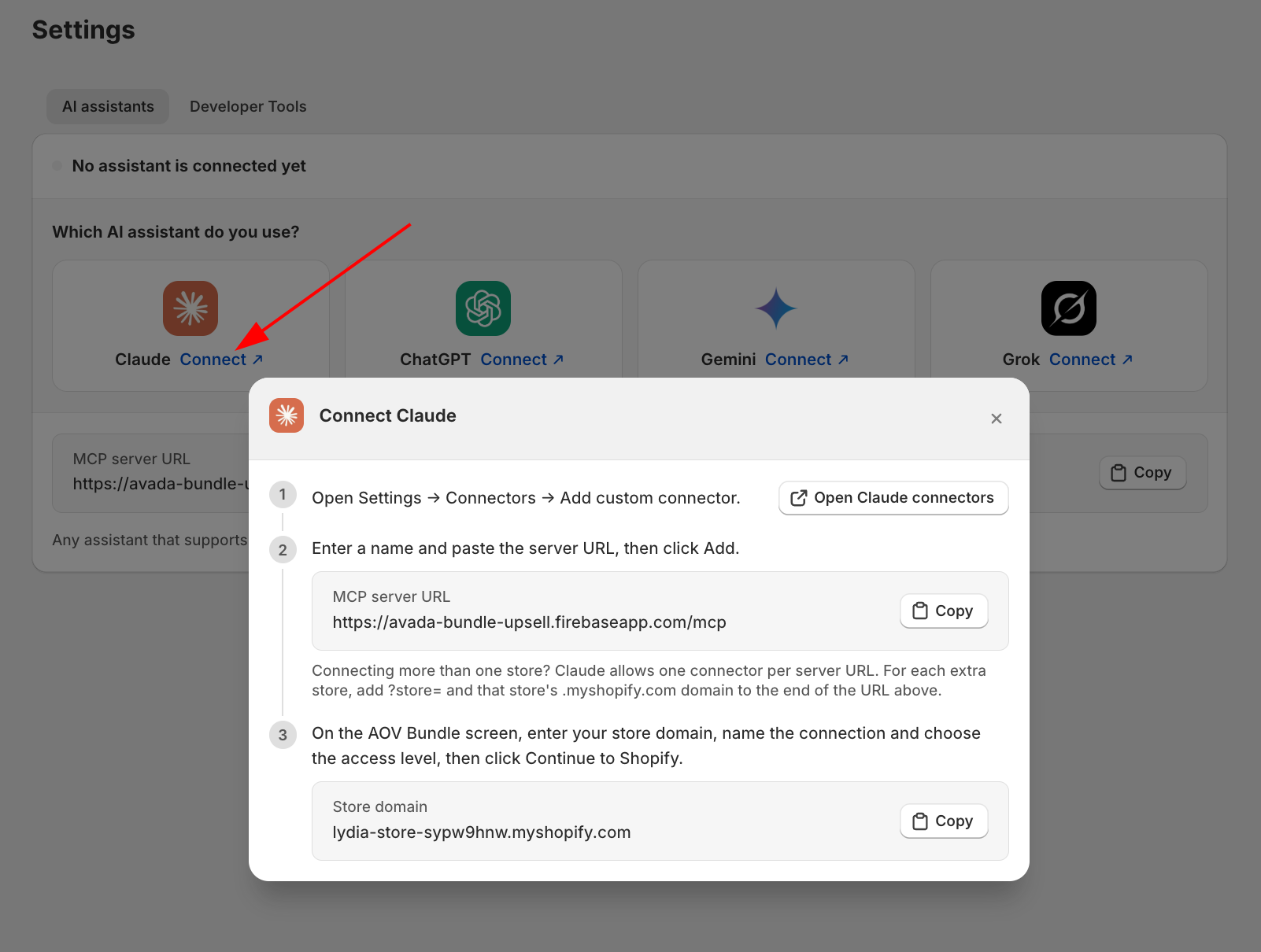
Approve the connection
A consent screen appears. It names the client that asked and the address the connection will be sent back to, and it asks for three things:
- The store's
.myshopify.comdomain, for examplenorthwind-goods.myshopify.com. Not your custom domain, and not the storefront address your shoppers use. If you are unsure, it is the domain shown in your Shopify admin URL. - A name for the connection, so you can tell it apart from others later.
- An access level: Read-only, or Read and write. Read and write can only be approved by the store owner; Read-only can be approved by any staff member who can view products.
Click Continue to Shopify, sign in, and approve.
Check the return address before approving. The connector's name is free text on an open endpoint. Anyone can register one called "Claude". The line naming where the connection is sent back to is the part that cannot be faked. If you did not start this from your own Claude settings, or you do not recognise that address, close the page.
The consent screen must be opened by you, in your own browser. A link someone else sends you will not work: the flow is bound to the browser that started it, and a mismatch is refused with "This sign-in did not start in this browser."
Check it worked
Open a new chat and look for the tools icon. The server should be listed with 14 tools on a Read-only connection, or 26 on a Read and write one. Then ask:
Are my bundles showing on the storefront right now?
Then open Settings → AI assistants in the app. The connection should be listed, named after the client, with a recent Last used and its access level shown as a badge.
Reconnecting
Connecting again usually replaces this client's previous token rather than stacking a second one, so reconnecting after any problem is safe. If the store already has a connection that matches exactly (same client, same approving Shopify user), you are asked whether to replace it or keep both.
To disconnect for good, remove the connector in Claude and click Disconnect on the row in Settings → AI assistants. Removing it in Claude alone leaves the connection working on the store.
If the sign-in fails
| Message | Means |
|---|---|
| This sign-in did not start in this browser | The flow was started somewhere else, or your browser blocked the cookie. Start again from Claude, in one browser |
| This sign-in expired or was already used | More than 30 minutes passed, or the link was opened twice. Start again |
| This sign-in was for a different store | The domain you typed and the store you signed into do not match |
| AOV Bundle is not installed on that store | Right domain, wrong store, or the app was uninstalled |
| Unknown client | Remove the connector in Claude and add it again |
More detail in Troubleshooting.