aov-bundle-upsell
Cross-app integrations

Cross-App Integrations

What This Page Is About

The AOV.ai Bundle Upsell left sidebar contains 5 entries that look like Bundle features but actually deep-link to other AOV.ai apps:

  1. Free Gift
  2. Checkout Upsell
  3. Post Purchase Upsell
  4. Pre-Order
  5. Volume Discount + Avada Joy Subscription

These sister apps complement what Bundle does. They're not built into Bundle and need their own installs.

This page explains what each one is and where to find its dedicated help docs.

Why They Live in the Bundle Sidebar

AOV.ai positions Bundle as part of a wider AOV growth suite. Putting the sister apps in Bundle's sidebar gives merchants a single jumping-off point to discover and install the other apps without leaving the Shopify admin.

Ignore any sidebar entry whose corresponding app you haven't installed. None of them affect Bundle's own offers.

The 5 Cross-App Entries

1. Free Gift

Free Gift cross-promo screen inside Bundle

Sister app: AOV.ai Free Gift & BXGY

What it does: Order Goal and Gift With Quantity Purchase patterns. Customers earn a free gift (or progressive gifts) for hitting a cart total, buying from a specific collection, or hitting a quantity threshold.

When to use it alongside Bundle: Bundle's own offer types don't natively cover "spend X to unlock a free gift" logic. Free Gift & BXGY does. Run them in parallel for combined volume + free-gift mechanics.

Help docs: see the AOV.ai Free Gift & BXGY help center for setup.

2. Checkout Upsell

Checkout Upsell cross-promo screen inside Bundle

Sister app: AOV.ai Checkout Upsell

What it does: "Take Full Control of Your Checkout Experience." Applies advanced checkout rules and cart validation to enforce minimum requirements, restrict payment methods, and simplify the buying flow for better conversion.

When to use it alongside Bundle: use Checkout Upsell to enforce minimum cart values (e.g., the threshold that unlocks a Bundle Builder tier) at checkout, or to restrict which payment methods are available for promotional carts.

Help docs: see the AOV.ai Checkout Upsell help center for setup.

3. Post Purchase Upsell

Post purchase upsell cross-promo screen inside Bundle

Sister app: AOV.ai Post Purchase Upsell

What it does: offers customers a relevant product immediately after checkout (the one-click post-purchase upsell) and on the Thank you page. Customers can accept the offer in one click. No re-entry of payment details.

When to use it alongside Bundle: Bundle captures AOV before checkout. Post Purchase Upsell captures it after. Together they cover the full pre- and post-checkout AOV journey on the same order.

Help docs: see the AOV.ai Post Purchase Upsell help center for setup.

4. Pre-Order

Pre-Order cross-promo screen inside Bundle

Sister app: AOV.ai Pre-Order

What it does: three things:

  1. Sell before you stock: turn out-of-stock pages into revenue. Customers can pre-order and get notified when items are back in stock.
  2. Collect payments your way: full payment, partial deposits, or pay-later. Auto-collect remaining balances when products are ready to ship.
  3. One dashboard for everything: track pre-order revenue, manage orders, and send shipping notifications from one place.

When to use it alongside Bundle: Bundle drives AOV on in-stock items. Pre-Order captures the revenue you'd otherwise lose on out-of-stock single-product pages. They cover different parts of the catalog.

Help docs: see the AOV.ai Pre-Order help center for setup.

5. Volume Discount + Avada Joy Subscription

Partner app: Avada Joy Subscription

What it does: Avada Joy Subscription enables recurring orders (subscriptions) on any product. The integration with AOV.ai Volume Discount lets merchants combine volume discount pricing with subscription orders; customers enrolled in a recurring order can still unlock tiered discount pricing from an active Volume Discount campaign.

When to use it: if you run Volume Discount campaigns on products that are also sold as subscriptions. Without the integration, subscription orders may bypass the Volume Discount tiers. With it, the discount logic applies to recurring orders the same way it does to one-time purchases.

What it looks like on the storefront:
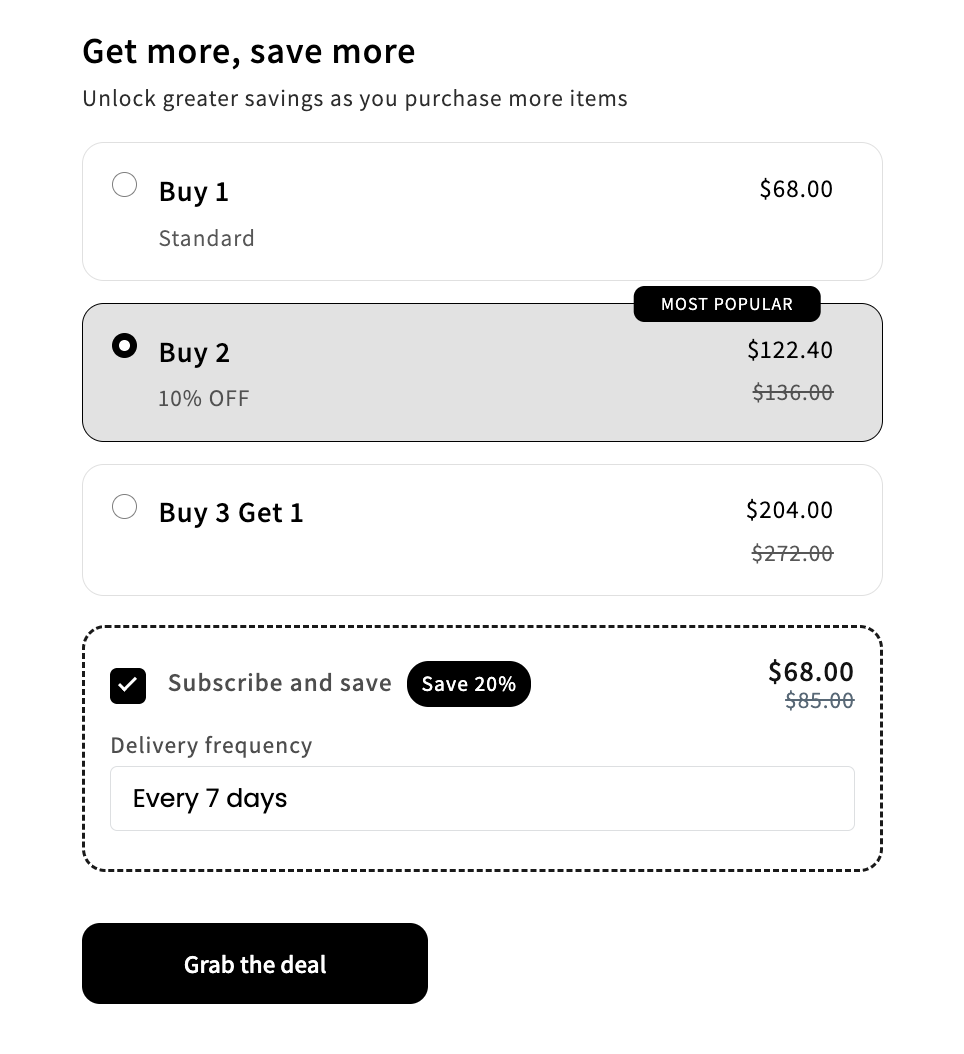
Volume Discount widget with Subscribe and save option powered by Avada Joy Subscription

Help docs: see the Avada Joy Subscription help center for setup details on enabling this integration.

What the Cross-App Entries Do Not Do

  • Each sister app has its own offer engine. Offers are configured inside each app separately, not inside Bundle.
  • Offer state is not shared. A Free Gift offer lives in the Free Gift app. A Pre-Order lives in the Pre-Order app.
  • Each app is billed separately on Shopify. Installing a sister app creates a separate billing plan.
  • Styling is not shared — with one exception: Avada Joy Subscription. When its subscription widget is paired with Bundle, it renders inside Bundle's widget and inherits Bundle's styling. Customize the look inside AOV.ai Bundle Upsell, not in the Avada Joy app.

Tips

  • Install in order of need, not all at once. Most merchants start with Bundle, add Post Purchase next, and bring in Free Gift or Pre-Order as the catalog/marketing matures.
  • Read each sister app's own help docs. This page is a pointer. The configuration details live in each app's documentation.
  • If a sidebar entry is missing or greyed out, the app may have been uninstalled or the link may be loading. Reload the Shopify admin.

Next Steps

Product
Install AppWebsiteAvada Apps
Resources
DocumentationFAQPrivacy Policy
Company
Avada GroupContact
© 2026 Avada Group. All rights reserved.