Checkout Customization
What Is It?
This page is where you control how your Shopify checkout behaves: validating orders before they go through, and customizing the payment and delivery methods shoppers see. The features are delivered by the companion app AOV.ai Checkout Rules (and, on Shopify Plus, AOV.ai Checkout Rules & Upsell), which you install from a button on this page.
The navigation label depends on your Shopify plan:
- On Shopify Plus stores it is labeled Checkout customization, and the page title reads Take control of your Shopify Checkout.
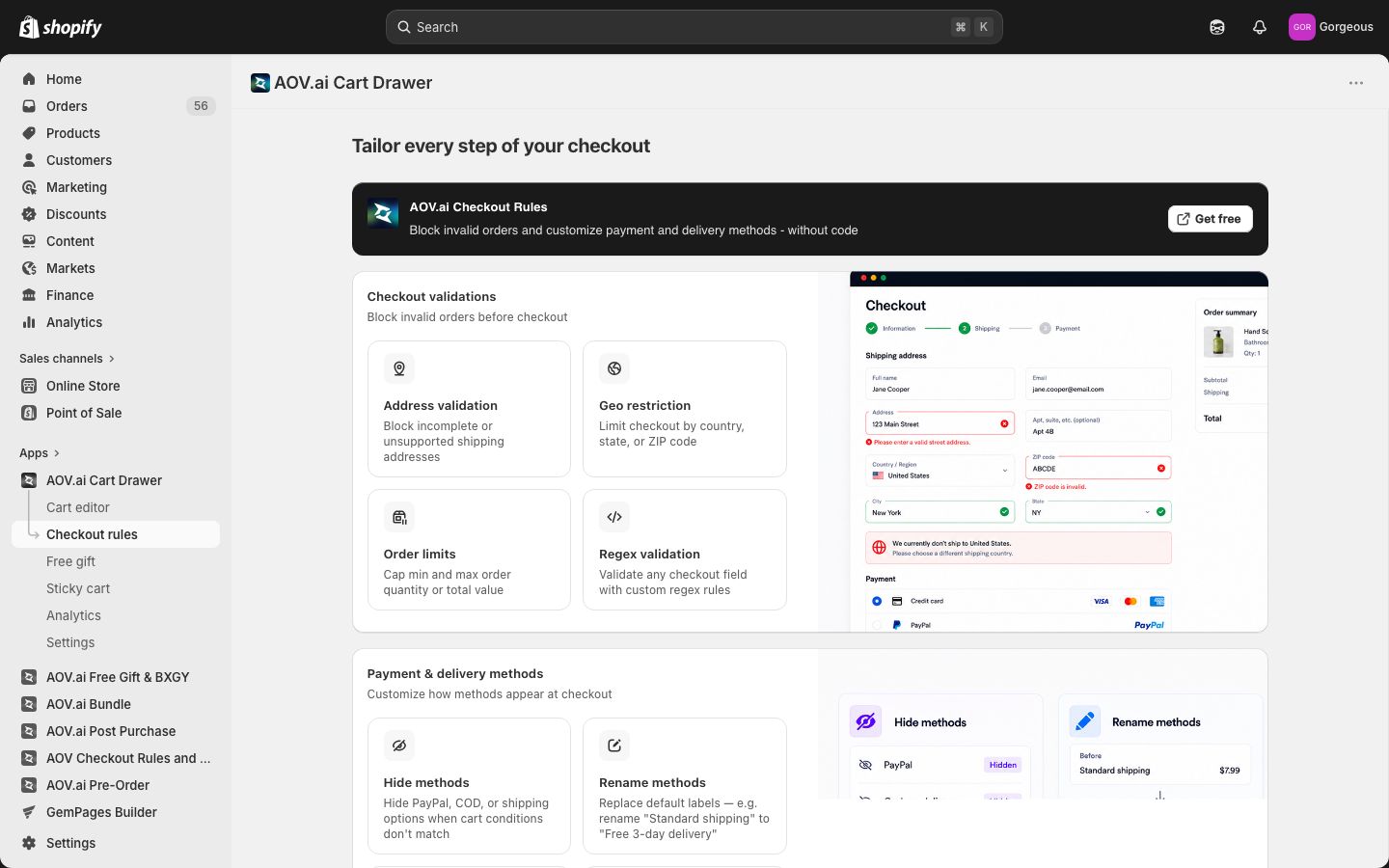
- On all other plans it is labeled Checkout rules, and the page title reads Tailor every step of your checkout.
When to Use It
- You want to block invalid orders (bad addresses, restricted regions, or out-of-range quantities) before a shopper reaches checkout
- You want to hide, rename, reorder, or discount the payment and delivery methods at checkout
- You are on Shopify Plus and want upsell, volume discounts, trust widgets, or VAT validation inside the checkout
Setup Walkthrough
Step 1: Open the Checkout Page
From the left navigation, click Checkout customization (Shopify Plus) or Checkout rules (all other plans).
Step 2: Install the Companion App
At the top of the page is a callout card for the companion app. Click Get free to open its App Store listing and install it. The card title is AOV.ai Checkout Rules & Upsell on Plus stores and AOV.ai Checkout Rules on other plans.
Checkout Validations
The Checkout validations section lets you block invalid orders before checkout. It is shown to every plan and contains four feature cards.
| Feature | What it does |
|---|---|
| Address validation | Block incomplete or unsupported shipping addresses |
| Geo restriction | Limit checkout by country, state, or ZIP code |
| Order limits | Cap min and max order quantity or total value |
| Regex validation | Validate any checkout field with custom regex rules |
Payment & Delivery Methods (non-Plus)
On non-Plus stores, the Payment & delivery methods section lets you customize how methods appear at checkout. It contains four feature cards.
| Feature | What it does |
|---|---|
| Hide methods | Hide PayPal, COD, or shipping options when cart conditions don't match |
| Rename methods | Replace default labels, for example rename "Standard shipping" to "Free 3-day delivery" |
| Reorder methods | Push preferred payment or shipping options to the top of the list |
| Shipping discount | Apply free, fixed or percent-off discounts to any shipping method |
Advanced Checkout (Plus only)
On Shopify Plus, the Advanced checkout section adds four more feature cards on top of checkout validations.
| Feature | What it does |
|---|---|
| Upsell offers at checkout | Recommend add-on products inside the checkout page |
| Volume savings | Offer quantity-tiered discounts to push buyers toward larger carts |
| Extra widgets — trust & security | Display trust badges and secure-payment marks at checkout |
| VAT validation | Collect and verify VAT numbers across 40+ countries |
Troubleshooting
Q1: I don't see the Advanced checkout section
The Advanced checkout section is Plus only. It is shown only on Shopify Plus stores. On other plans you will see Checkout validations and Payment & delivery methods instead.
Q2: The navigation item has a different name than this guide
The label changes by plan. Shopify Plus stores see Checkout customization; all other plans see Checkout rules. Both open the same page.
Q3: Clicking Get free didn't enable any features
Get free opens the App Store listing for the companion app so you can install it. The validation and method-customization features live inside that app once it is installed, so finish the install to configure them.
Q4: I'm not sure which features apply to my store
Checkout validations and payment and delivery method controls are available to all plans. Upsell, volume savings, trust widgets, and VAT validation are part of the Advanced checkout section reserved for Shopify Plus.