# A/B testing
### Applicable Campaign Types
A/B testing is available for the following campaign types:
* **Gift with cart value**
* **BXGY (Buy X Get Y)**
***
### What can be tested?
With A/B testing, you can test the **gift or discount customers receive** under the same spending condition.
**Goals:**
* Understand customer preferences when spending the same amount of money.
* Compare the effectiveness of different reward types (discounts vs. free gifts) in driving conversion, AOV, and additional value.
**Use Cases:**
* Spend $50 → Option A: 10% off socks vs. Option B: 10% off t-shirt
* Spend $50 → Option A: free clock vs. Option B: free glasses
***
### Setup
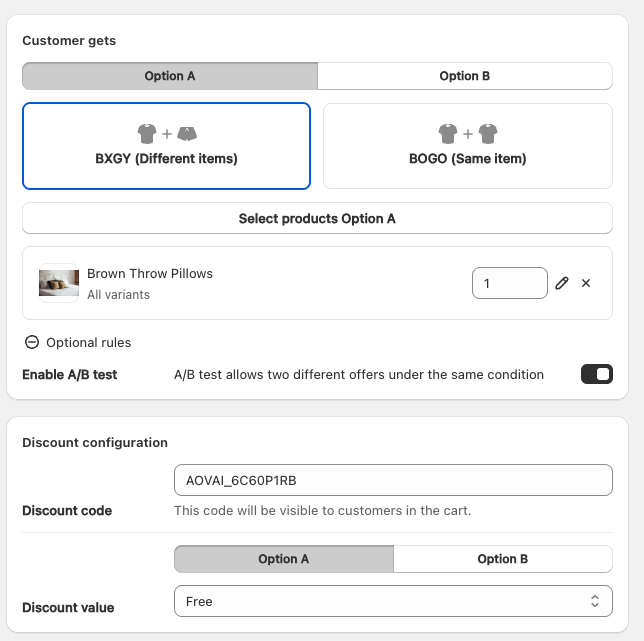
1. **Create or edit a campaign** (Gift with cart value or BXGY).
2. Inside the campaign editor, enable **A/B test**.
* This will allow you to configure **Option A** and **Option B** rewards under the same condition.
3. Define the reward for each option (discount or free gift).
4. Save and activate the campaign.
Customers will be randomly assigned to either **Option A** or **Option B** when they meet the campaign condition.
***
### Analytics
In the campaign list, you can track performance for each option within the A/B test:
* **Views**: Number of times the offer was shown.
* **ATCs (Add to Carts)**: Number of times customers added the gift/discount.
* **CR (Conversion Rate)**: How effectively the offer converts views into actions.
* **Revenue / Additional Value**: Contribution of each option to your store’s revenue.
By comparing Option A and Option B results, you can identify which reward drives better performance and optimize future campaigns accordingly.
---
# Agent Instructions: Querying This Documentation
If you need additional information that is not directly available in this page, you can query the documentation dynamically by asking a question.
Perform an HTTP GET request on the current page URL with the `ask` query parameter:
```
GET https://help.aov.ai/advanced-settings/a-b-testing.md?ask=
```
The question should be specific, self-contained, and written in natural language.
The response will contain a direct answer to the question and relevant excerpts and sources from the documentation.
Use this mechanism when the answer is not explicitly present in the current page, you need clarification or additional context, or you want to retrieve related documentation sections.