# Gift quantity selector
### Overview
The **Gift Quantity Selector** feature allows customers to choose how many of each gift they want when they qualify for multiple gifts.\
It improves flexibility and user experience, ensuring customers can customize their rewards instead of having the system auto-assign gifts.
***
### When to Use
For example:\
If a customer qualifies for 5 total gifts from 3 gift types (A, B, C), they can now freely select their preferred combination — such as 2 of A, 2 of B, and 1 of C — instead of being auto-assigned all the same type.
***
### How It Works
#### 1. Campaign Setup (Merchant)
* Available for campaign types:
* Buy X Get Y
* Gift with Quantity Purchase
* Gift with Cart Value
**Setup Steps:**
1. Go to your campaign settings.
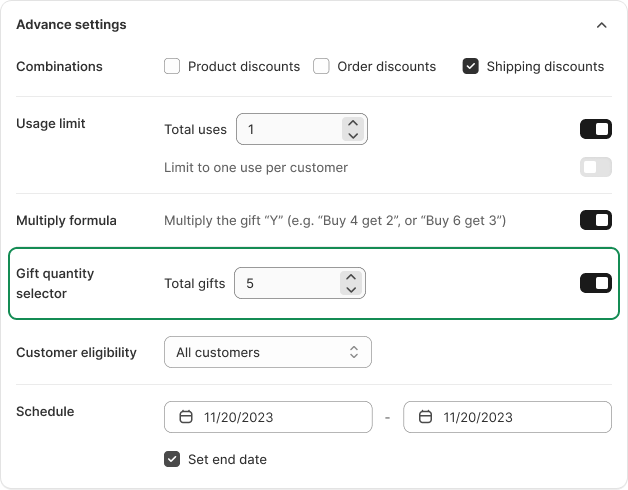
2. Under **Advanced Settings**, enable **Gift Quantity Selector**.
3. Define the **total number of gifts** customers can receive.
4. Save and activate the campaign.
***
#### 2. Customer Experience
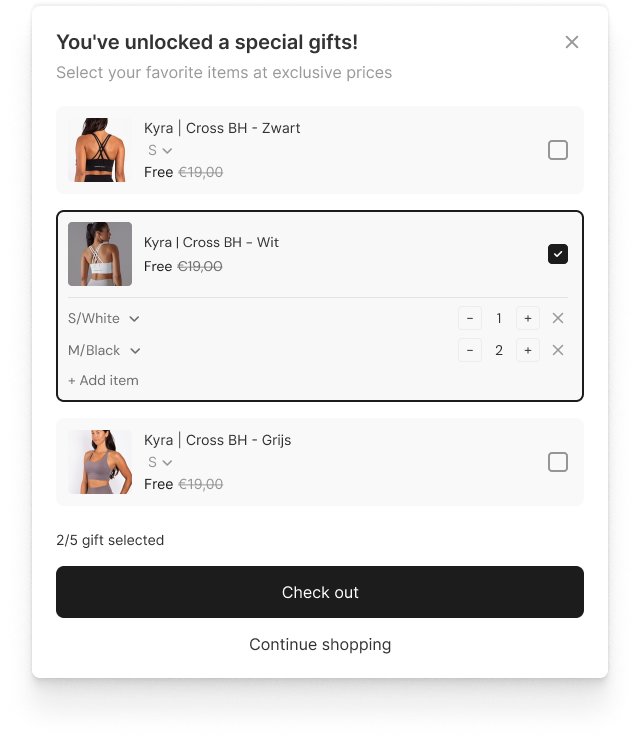
When customers qualify for multiple gifts, they’ll see a **gift selection popup** allowing them to:
* View all available gift options.
* Choose which gifts by variant they want.
* Adjust quantities for each gift, up to the total allowed limit.
**Example:**\
If the customer qualifies for 4 gifts, customer can mix and match items freely (e.g., 2 white, 1 black, 1 gray).
***
### Notes
* Available for **all plans**.
* Gift selection happens before adding to cart, ensuring clarity and transparency.
***
---
# Agent Instructions: Querying This Documentation
If you need additional information that is not directly available in this page, you can query the documentation dynamically by asking a question.
Perform an HTTP GET request on the current page URL with the `ask` query parameter:
```
GET https://help.aov.ai/advanced-settings/gift-quantity-selector.md?ask=
```
The question should be specific, self-contained, and written in natural language.
The response will contain a direct answer to the question and relevant excerpts and sources from the documentation.
Use this mechanism when the answer is not explicitly present in the current page, you need clarification or additional context, or you want to retrieve related documentation sections.